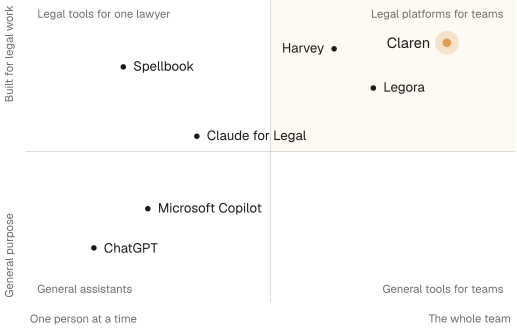
What each tool does, who it’s built for, where it falls short for an in-house team, and what it costs.
Harvey
A large toolkit for law firms. For an in-house team it is a lot of platform, and nobody to run it.
Harvey is built for law firms. It covers drafting and analysis with agents, Vault for storing and bulk-analysing documents, Knowledge for legal, regulatory and tax research, Spaces for working with co-counsel behind ethical walls, contract intelligence and regulatory horizon scanning. It works in Word and Outlook and connects to iManage and NetDocuments. It uses models from Anthropic, OpenAI and Google, picked per task.
Strengths
- Research, document storage, drafting and collaboration in one platform.
- SOC 2 Type II, ISO 27001, 27701 and 42001, with SSO and audit logs.
- Connects to iManage and NetDocuments.
Where it falls short
- A toolkit, not a teammate: every piece of work still starts and ends with a lawyer at a keyboard.
- Not suited to in-house intake: it is built around law-firm matters, not the stream of requests a legal team gets from the business.
- Sized for firms, not legal teams, with reported minimums of about 20 seats.
- Best for
- Law firms that want a large research and drafting toolkit, and have the lawyers free to drive it.
Harvey compared in full →Legora
Suited to bulk review for firms. For in-house work that arrives one request at a time, it is the wrong shape.
Legora covers agents, Tabular Review (a grid that pulls the same answers out of many documents at once), workflows, legal research, an editor, Word and Outlook add-ins, a mobile app, monitors, intake, and a Portal for working with clients. It connects to iManage and NetDocuments.
Strengths
- Tabular Review: one grid that pulls the same answers out of many documents at once.
- A client Portal for collaborating outside the firm.
- Bulk review across many documents at once.
- SOC 2 Type II, ISO 27001 and ISO 42001. Models reportedly run in the customer's region.
Where it falls short
- Not built to take work off the team: its agents wait for a lawyer to open Legora and start them.
- Sized for firms, with a reported minimum of about 10 seats.
- Poorly suited to in-house intake: it is built around firm matters and client work.
- Best for
- Firms whose work is mostly reviewing documents in bulk.
Legora compared in full →Spellbook
A drafting aid for one lawyer. It doesn't do the work for the team.
Spellbook runs inside Microsoft Word. It reviews and redlines contracts, drafts clauses, compares terms against market standards, applies playbooks, and handles multi-document work. Its newer contract management tools add intake, a repository and renewal monitoring.
Strengths
- Works where contract lawyers already are: in Word.
- First-pass review, with market benchmarks.
- A 7-day free trial.
- SOC 2 Type II.
Where it falls short
- An assistant, not an employee: it helps one lawyer draft, and takes no work off the team.
- Narrow: contracts only, and only in the document that is open.
- Lighter on certification: no ISO 27001 listed.
- Best for
- Individual lawyers who want drafting help inside Word, and nothing more.
Spellbook compared in full →Claude for Legal
A general model with legal plugins added. Turning it into a working legal team is left to you.
Anthropic launched Claude for the legal industry in May 2026: 12 practice-area plugins (commercial, corporate, employment, privacy, regulatory, IP, litigation and more) and 23 connectors, including iManage, NetDocuments, Ironclad, Docusign, Box and Thomson Reuters CoCounsel. It redlines in Word with tracked changes against a playbook, and can run scheduled tasks. The plugins are open source, and each starts with a short interview that records your playbook and house style.
Strengths
- Runs on Anthropic's general-purpose models.
- A wide set of legal connectors.
- Open-source plugins a team can adapt.
Where it falls short
- Not a legal team out of the box: each lawyer sets it up and works alone, in their own Claude.
- Unreliable on authority without a paid research connector: citations come back flagged for checking.
- Weaker data terms for legal work: Anthropic says its Team and Enterprise apps aren't eligible for zero data retention.
- Best for
- Lawyers happy to set up and run their own AI, one person at a time.
Claude for Legal compared in full →ChatGPT
A general assistant, not a legal one. Useful for a first draft; every answer needs a lawyer to check it.
ChatGPT is a general assistant for drafting, summarising and answering questions. OpenAI has no legal-specific product.
Strengths
- Quick to try, and widely used.
- Business and Enterprise plans are reported to exclude your data from training by default.
Where it falls short
- Not tailored to legal workflows: no playbooks, no review queue, no contract records.
- Invented case citations have led to sanctions, in Mata v Avianca (New York, 2023) and Ayinde v Haringey (England, 2025).
- The SRA warned in August 2026 that client data belongs only in tools with proper safeguards, and that privilege can be waived through public tools.
- Best for
- Quick, low-stakes drafting, with a lawyer checking every line.
ChatGPT compared in full →Microsoft Copilot
Playbook review inside one Word document. It doesn't take requests, keep records or run on its own.
Microsoft's Legal Agent in Word flags risky and non-standard clauses, compares a contract with a playbook, and redlines with tracked changes. It came to preview in April 2026 and was reported generally available in July 2026, as part of a Microsoft 365 Copilot licence. Google's Gemini in Workspace has no legal-specific product.
Strengths
- Inside Word, with no new vendor to approve.
- Included with a Microsoft 365 Copilot licence.
Where it falls short
- One document at a time, inside the Word desktop app.
- Not suited to team work: no intake, no shared records, nothing that runs on its own.
- Early: Microsoft's legal features are new, and limited to Word.
- Best for
- Occasional clause checks, for teams already paying for Microsoft 365.
Microsoft Copilot compared in full →Claren
The only tool here built as AI employees for in-house legal teams: they take the request, do the work and hand it back finished.
Claren gives a legal team AI employees, called envoys. Each envoy has its own computer and its own memory, takes work from the Claren app or from Slack, and hands back finished work: redlines in Word with tracked changes, a contract tracker filled in, a data room read and indexed. Envoys run routines on a schedule or when a message lands, pass work to each other, and ask you before anything leaves the team.
What it does for an in-house team
- Built for in-house legal teams from the start.
- AI employees, not a chat box. Envoys take a request, do the work and hand it back finished.
- Work that starts on its own: routines run on a schedule, or when a Slack message lands.
- The team's own records. Envoys build and keep a datastore of your contracts and terms, and build apps on it: a tracker, a dashboard, your own CLM views.
- Your playbook goes in once, and every envoy follows it on every contract.
- SOC 2 Type II and ISO/IEC 27001:2022. Data in the US, UK or EU, never used to train models.
- Best for
- In-house legal teams that want work taken off their plate, not just made faster.
Claren pricing →